URLs and URLConnections provide a
relatively high-level mechanism for accessing resources on the Internet.
Sometimes your programs require lower-level network communication, for
example, when you want to write a client-server application.In client-server applications, the server provides some service, such as processing database queries or sending out current stock prices. The client uses the service provided by the server, either displaying database query results to the user or making stock purchase recommendations to an investor. The communication that occurs between the client and the server must be reliable. That is, no data can be dropped and it must arrive on the client side in the same order in which the server sent it.
TCP provides a reliable, point-to-point communication channel that client-server applications on the Internet use to communicate with each other. To communicate over TCP, a client program and a server program establish a connection to one another. Each program binds a socket to its end of the connection. To communicate, the client and the server each reads from and writes to the socket bound to the connection.
Socket
A socket is one end-point of a two-way communication link between two programs running on the network. Socket classes are used to represent the connection between a client program and a server program. The java.net package provides two classes--Socket and ServerSocket--that implement the client side of the connection and the server side of the connection, respectively.
Reading from and Writing to a Socket
This client program is straightforward and simple because the echo server implements a simple protocol. The client sends text to the server, and the server echoes it back. When your client programs are talking to a more complicated server such as an HTTP server, your client program will also be more complicated. However, the basics are much the same as they are in this program:
- Open a socket.
- Open an input stream and output stream to the socket.
- Read from and write to the stream according to the server's protocol.
- Close the streams.
- Close the socket.
Port Numbers
1. Port numbers are 16-bit integers (0 - 65,535)
- Servers use well know ports, 0-1023 are privileged
- Clients use ephemeral (short-lived) ports
2. Internet Assigned Numbers Authority (IANA) maintains a list of port number assignment
- Well-known ports (0-1023) - controlled and assigned by IANA
- Registered ports (1024-49151) - IANA registers and lists use of ports as a convenience (49151 is 3/4 of 65536)
- Dynamic ports (49152-65535) - ephemeral ports
3. For well-known port numbers, see /etc/services on a UNIX or Linux machine
Socket Addressing
1. Process-to-process delivery needs two identifiers
- IP address and Port number
- Combination of IP address and port number is called a socket address (a socket is a communication endpoint)
- Client socket address uniquely identifies client process
- Server socket address uniquely identifies server process
2. Transport-layer protocol needs a pair of socket addresses
- Client socket address
- Server socket address
- Socket pair for a TCP connection is a 4-tuple :Local IP address, local port, foreign IP address, foreign port

Socket Client
SocketAddress serverAddress = new InetSocketAddress("198.203.192.112", 8100);
SocketAddress clientAddress = new InetSocketAddress("192.168.0.101", 55303);
//Create socket and bind the client socket address
Socket socket = new Socket();
socket.bind(clientAddress);
//Establish connection using server socket address and connection time out 2 seconds
socket.connect(serverAddress,2000);
//Set socket read time out i,e 5 seconds
socket.setSoTimeout(5000);
//Write to socket using ObjectOutputStream
ObjectOutputStream oos = new ObjectOutputStream(socket.getOutputStream());
oos.writeObject("7b22342e3130223a22302e3030222c22342e3131223a2");
//Read the server response message using ObjectInputStream
ObjectInputStream ois = new ObjectInputStream(socket.getInputStream());
String response = (String) ois.readObject();
System.out.println("Message: " + response);
//Close the underlying resources
ois.close();
oos.close();
socket.close();
- There are some common exceptions and errors that arise while using socket and most of time developers are failed to analyze and identify the exact reason for the exceptions and errors.
- Understanding these messages will not only help resolve the issues but also to make conscious effort in avoid these scenarios while developing applications.
- Trying to connect wrong IP/Port (or) have not started the server yet ?
- Server is listening for connections (or) the listen backlog queue is full ?
- Is there any firewall blocking the connection before reaching to the server ?
- Is there any connection issues with server or client ?
- Is server rejecting the connection or any network the middle layer is rejecting it ?
- Is there any delay of getting connection or getting response from server ?
- Sever is sending the response or not , Request is receiving at server or not ?
- Client is unable to receive the response , but server is sending the response ?
- Server is unable to receive the request, but client is sending the request ?
- Taking more time to read the response from socket or any thing else ?
- java.net.SocketException: No buffer space available (maximum connections reached?)
- java.net.SocketException: Broken pip
- java.net.SocketException: Connection reset
- java.net.SocketException: Too many open files
- java.net.BindException: Address already in use: JVM_Bind
- java.net.BindException: Address already in use: connect
- java.net.ConnectException: Connection refused
- java.net.SocketTimeoutException: Read timed out
- java.net.SocketException: Connection timed out
- java.io.EOFException at java.io.DataInputStream
- java.net.SocketException: Socket closed
- java.net.SocketException: Connection closed by remote host
- java.net.SocketException: Permission denied
Wireshark
- Wireshark is the world’s foremost and widely-used network protocol analyzer. It lets you see what’s happening on your network at a microscopic level.
- Wireshark is a software that analyses packets sent throughout a network. It will display each packet and the details within the packet. Network administrators use it to analyze the network and to troubleshoot an issue if they see a problem.
- Wireshark has many capabilities, some of the key features are that it can catch packets in a real-time network.
- It can also save packets and the packets are laid out on a very clear GUI. Network admins can use Wireshark to identify and troubleshoot problems throughout the network by searching through the packets.
- Troubleshoot problems faster,Quickly identify the applications running on your network,Monitor your virtual machine traffic



Normal Flow (end to end data sending and receiving)

Wireshark can record all packet traffic and sort it by the protocol used.Lets analyses packets sent throughout a network. Before analyzing the the packets we need to get the knowledge about TCP states ,TCP Header Fields and TCP flag bits with the segments.
- Unlike UDP ,TCP is a connection oriented protocol , in other words a connection has be established before u can start sending data.
- The Transmission Control Protocol (TCP) is one of the main protocols of the Internet protocol suite. It originated in the initial network implementation in which it complemented the Internet Protocol (IP). Therefore, the entire suite is commonly referred to as TCP/IP.
- TCP provides a connection oriented, reliable, byte stream service. The term connection-oriented means the two applications using TCP must establish a TCP connection with each other before they can exchange data.
- During this connection establishment both sides can exchange and initiates state variables.
- For example they can negotiate what is the maximum MSS size they want to use , only they can exchange the initial sequence number and we can also figure out what is the acknowledgement type you want to imply either selective ACK or cumulative ACK.
- Apart from this you can also allocate resource for example buffer space. once the connection established both sides the sender and receiver are going to allocate the some buffer space like for the send buffer and the receive buffer , how much is actually allocated is a function of the os, so these numbers can be ranged from 4KB to all MB , in fact you can configure this, for example in some linux system its value is 8 KB.
1. Point-to-point (unicast): one sender, one receiver
2. Connection-oriented:
- Handshaking (exchange of control msgs) init’s sender, receiver state before data exchange
- State resides only at the END systems – Not a virtual circuit!
- Bi-directional data flow in same connection (A->B & B->A in the same connection)
- MSS: maximum segment size
- Reliable, in-order byte steam:no “message boundaries”
5. Flow controlled: sender will not overwhelm receiver
6. Congestion controlled: sender will not overwhelm network

Reliable
1. Byte stream is broken up into chunks which are called segments
- Receiver sends acknowledgements (ACKs) for segments
- TCP maintains a timer. If an ACK is not received in time, the segment is re-transmitted
2. Detecting errors:
- TCP has checksums for header and data. Segments with invalid checksums are discarded
- Each byte that is transmitted has a sequence number
TCP Segment Structure
TCP data is encapsulated in an IP datagram. The figure shows the format of the TCP header. Its normal size is 20 bytes unless options are present. Each of the fields is discussed below:

TCP Header Fields
1. SrcPort and DstPort fields identify the source and destination ports,respectively. These two fields plus the source and destination IP addresses, combine to uniquely identify each TCP connection.
2. Sequence Number : The sequence number identifies the byte in the stream of data from the sending TCP to the receiving TCP that the first byte of data in this segment represents
2. Sequence Number : The sequence number identifies the byte in the stream of data from the sending TCP to the receiving TCP that the first byte of data in this segment represents
- Sequence number is 32 bits long.
- So the range of SeqNo is 0 <= SeqNo <= 232 -1 = 4.3 Gbyte
- Each sequence number identifies a byte in the byte stream
- Initial Sequence Number (ISN) of a connection is set during connection establishment
3. Acknowledgment Number : The Acknowledgement number field contains the next sequence number that the sender of the acknowledgement expects to receive. This is therefore the sequence number plus 1 of the last successfully received byte of data. This field is valid only if the ACK flag is on. Once a connection is established the Ack flag is always on.
- The acknowledgment number is cumulative.
- Acknowledgements are piggybacked, I.e a segment from A -> B can contain an acknowledgement for a data sent in the B -> A direction
- The AckNo contains the next SeqNo that a hosts wants to receive.
- Example: The acknowledgement for a segment with sequence numbers 0-1500 is AckNo=1501
4. Header Length: The header length gives the length of the header in 32-bit words. This is required because the length of the options field is variable.
5. Window Size :
- Each side of the connection advertises the window size
- Window size is the maximum number of bytes that a receiver can accept.
- Maximum window size is 216-1= 65535 bytes
6. TCP Checksum: The Checksum covers the TCP segment: the TCP header and the TCP data. This is a mandatory field that must be calculated by the sender, and then verified by the receiver.
7. Urgent Pointer : Only valid if URG flag is set.
8. Option field: The Option field is the maximum segment size option, called the MSS. Each end of the connection normally specifies this option on the first segment exchanged. It specifies the maximum sized segment the sender wants to recieve.
9. Data portion: The data portion of the TCP segment is optional.
10. Flag Bits: The 6-bit Flags field is used to relay control information between TCP peers. The possible flags include SYN, FIN, RESET, PUSH, URG, and ACK.
- URG: Urgent pointer is valid
- ACK: Acknowledgement Number is valid
- PSH: PUSH Flag
- RST: Reset the connection
- SYN: Synchronize sequence numbers
- FIN: Sender is finished with sending

- The SYN and FIN flags are used when establishing and terminating a TCP connection, respectively.
- The ACK flag is set any time the Acknowledgement field is valid, implying that the receiver should pay attention to it.
- The URG flag signifies that this segment contains urgent data. When this flag is set, the UrgPtr field indicates where the non-urgent data contained in this segment begins. The following bytes contains an utgent message in the range: (SeqNo <= urgent message <= SeqNo+urgent pointer)
- The PUSH flag signifies that the sender invoked the push operation, which indicates to the receiving side of TCP that it should notify the receiving process of this fact. Normally set by sender when the sender’s buffer is empty
- Finally, the RESET flag signifies that the receiver has become confused and so wants to abort the connection.
TCP states - explained
- CLOSED: There is no connection. (No connection exists)
- LISTEN: The Server is waiting for a connection request from the Client. (Passive open received; waiting for SYN)
- SYN-SENT : SYN sent from Client;Waiting for ACK from Server. (SYN sent;Waiting for ACK)
- SYN-RCVD : SYN+ACK sent from Server;Waiting for ACK from Client. (SYN+ACK sent;Waiting for ACK)
- ESTABLISHED: The third step of the three-way connection handshake was performed. (Connection established;Data transfer in progress)
- FIN-WAIT-1: The first step of an active close (four-way handshake) was performed. The Client has sent a connection termination request to the Server. (First FIN Sent,Waiting for ACK)
- CLOSE-WAIT: The Server has received a connection termination request and acknowledged it .e.g. a passive close has been performed and the Client needs to perform an active close to leave this state. (First FIN received,ACK sent;Waiting for application to close)
- FIN-WAIT-2: The Server has sent an acknowledgement for the previously sent connection termination request. The Client waits for an active connection termination request from the remote end-point.(ACK to first FIN received;waiting for second FIN)
- LAST-ACK: The Server has performed a passive close and has initiated an active close by sending a connection termination request to the Client. (Second FIN sent;Waiting for ACK)
- TIME-WAIT: The Client waits for twice the maximum segment lifetime (MSL) to pass before going to CLOSED to be sure that the Server received the acknowledgement. (Second FIN received,ACK sent;waiting for 2MSL time-out)
- CLOSING: The Client is waiting for an acknowledgement for a connection termination request before going to the TIME-WAIT state.(Both sides decide to close simultaneously)
NOTE 1:
- FIN_WAIT_2 seems to occur when the server has an active connection with a client and wants to shut down the TCP connection (probably in response to a normal application layer "exit").
- The server sends the client a packet with a "FIN" bit set. At this point, the server is in FIN_WAIT_1 state. The client gets the FIN packet and goes into CLOSE_WAIT state, and sends an acknowledgment packet back to the server.
- When the server gets that packet, it goes into FIN_WAIT_2 state. From the server's perspective, the connection is now closed, and the server can't send any more data.
- However, under the TCP protocol, the client needs to shut down also by sending a FIN packet, which the server TCP implementation should ACK. The server should close after a period of time defined by the Maximum Segment Lifetime (MSL).
2MSL Wait State :
a) 2MSL Wait State = TIME_WAIT
- When TCP does an active close, and sends the final ACK, the connection must stay in in the TIME_WAIT state for twice the maximum segment lifetime.
- TCP is given a chance to resent the final ACK. (Server will timeout after sending the FIN segment and resend the FIN)
- The MSL is set to 2 minutes or 1 minute or 30 seconds.
- The bytes of data being transferred in each connection are numbered by TCP.The numbering starts with an arbitrarily generated number.
- The value in the sequence number field of a segment defines the number assigned to the first data byte contained in that segment.
- The value of the acknowledgment field in a segment defines the number of the next byte a party expects to receive and it is cumulative.
- The use of the checksum in TCP is mandatory.
- A SYN segment cannot carry data, but it consumes one sequence number.
- A SYN + ACK segment cannot carry data, but does consume one sequence number.
- The FIN segment consumes one sequence number if it does not carry data.
- The FIN + ACK segment consumes one sequence number if it does not carry data.
TCP Starting Sequence Number Selection
Why a random starting sequence #? Why not simply choose 0?
- To protect against two incarnations of the same connection reusing the same sequence numbers too soon.
- That is, while there is still a chance that a segment from an earlier incarnation of a connection will interfere with a later incarnation of the connection
How ?
- Client machine seq #0, initiates connection to server with seq #0.
- Client sends one byte and client machine crashes
- Client reboots and initiates connection again
- Server thinks new incarnation is the same as old connection
Open a Connection(Three way handshake) - socket.connect(serverAddress,2000)
The famous three-way handshake of TCP , this idea was purposed by Tomlinson .

This diagram illustrates how a conventional connection is established between a client and a server , showing the three messages sent during the process and how each device transitions from the CLOSED state through intermediate states until the session is ESTABLISHED.
This side establish first:
CLOSED -> SYN-SENT -> ESTABLISHED
The other side establish first:
CLOSED -> LISTEN -> SYN-RECEIVED -> ESTABLISHED
- Suppose Client wants to established a connection with Server,it is going to send this initial packet (this is the initial synchronization packet) and as the part of the packet it is going to tell Server i am going to use sequence number starting from x .
- Now in response to this packet ,Server is going to set the flag SYNC and ACK ,where it is also synchronizing with Client and saying i am going to use sequence number y and it is acknowledging this particular packet by saying i want x+1.
- Now Client has to acknowledge this packet and so it is again going to set the flag ACK and it is acknowledging this packet by saying i want y+1.
- And it can potentially sent data as the part of this connection , by the way it is not need ,you could decide not to sent data , if you are sending data you are going to start that particular sequence number with x+1.
Client
|
Server
|
||||
Start State
|
Action
|
Move To State
|
Start State
|
Action
|
Move To State
|
CLOSED
|
The client cannot do anything until the server has performed a
passive OPEN and is ready to accept a connection. (Well, it can try, but
nothing will be accomplished until the server is ready.)
|
-
|
CLOSED
|
The server performs a passive OPEN, creating a transmission control
block (TCB) for the connection and readying itself for the receipt of a
connection request (SYN) from a client.
|
LISTEN
|
CLOSED
|
Step #1 Transmit: The client performs an active OPEN, creating a
transmission control block (TCB) for the connection and sending a SYN message
to the server.
|
SYN-SENT
|
LISTEN
|
The server waits for contact from a client.
|
-
|
SYN-SENT
|
The client waits to receive an ACK to the SYN it has sent, as well as
the server's SYN.
|
-
|
LISTEN
|
Step #1 Receive, Step #2 Transmit:
The server receives the SYN from the client. It sends a single SYN+ACK
message back to the client that contains an ACK for the client's SYN, and the
server's own SYN.
|
SYN-RECEIVED
|
SYN-SENT
|
Step #2 Receive, Step #3 Transmit: The client receives from the server the SYN+ACK
containing the ACK to the client's SYN, and the SYN from the server. It sends
the server an ACK for the server's SYN. The client is now done with the
connection establishment.
|
ESTABLISHED
|
SYN-RECEIVED
|
The server waits for an ACK to the SYN it sent previously.
|
-
|
ESTABLISHED
|
The client is waiting for the server to finish connection
establishment so they can operate normally.
|
-
|
SYN-RECEIVED
|
Step #3 Receive: The
server receives the ACK to its SYN and is now done with connection
establishment.
|
ESTABLISHED
|
ESTABLISHED
|
The client is ready for normal data transfer operations.
|
-
|
ESTABLISHED
|
The server is ready for normal data transfer operations.
|
-
|
Special Case 1 (TCP simultaneous open connection establishment procedure)

This diagram shows what happens when two devices try to open a connection to each other at the
same time.In this case instead of a three-way handshake,each sends a SYN and receives an ACK. They each follow the same sequences of states, which differs from both sequences in the normal three-way handshake.
Both sides established at the same time:
CLOSED -> SYN-SENT-> SYN-RECEIVED -> ESTABLISHED
Client
|
Server
|
||||
Start State
|
Action
|
Move To State
|
Start State
|
Action
|
Move To State
|
CLOSED
|
Client A Step #1 Transmit:
Client A performs an active OPEN, creating a TCB and sending a SYN message to
the server.
|
SYN_SENT
|
CLOSED
|
Client B Step #1 Transmit:
Client B performs an active OPEN, creating a TCB and sending a SYN to the
server.
|
SYN_SENT
|
SYN_SENT
|
Client B Step #1 Receive and Step #2
Transmit: Client A receives Client B's SYN and sends it an ACK. It
is still waiting for an ACK to its own SYN.
|
SYN-RECEIVED
|
SYN_SENT
|
Client A Step #1 Receive and Step #2
Transmit: Client B receives Client A's SYN and sends it an ACK. It
is still waiting for an ACK to its own SYN.
|
SYN-RECEIVED
|
SYN-RECEIVED
|
Client A Step #2 Receive:
Client A receives the ACK from Client B for its SYN and is done with
connection establishment.
|
ESTABLISHED
|
SYN-RECEIVED
|
Client B Step #2 Receive:
Client B receives the ACK from Client A for its SYN and is done with
connection establishment.
|
ESTABLISHED
|
Connection Termination (Two Army Problem)

- There is the blue army and there is the red army which is the enemy of blue the army. Now the blue army is split , one battalion is top of one hill and other battalion is top of another hill and this enemy is in the valley.
- So this enemy is rather large , this attack from the blue army will succeed only if and only , if both of them attack the enemy at the same time.
- If only one of them attacks it will be defeated ,and Here is the problem ,both army 1 and army 2 need to decide on when to attack this red army , for which they need to communicate and the messenger who is going to communicate has go through the valley to deliver this message to army 2 and there is a danger that this messenger could be captured by this particular enemy.
- So what strategy should they adopt so that ensure that they both attack the red army at same time.
There is no solution for that problem.
- Suppose this blue army send a message lets called it message 1(Lets attack on Sunday at 9 AM), After sending this message do you think this army 1 can just go ahead and attack the red army on Sunday at 9 am No right what if this message was lost in other word the messenger got captured ,then army 1 will get defeated,
- So what it should do when it is sending the message , it can say please ACK and let suppose this message got through and this army 2 is going to say "Ok fine lets attack" and it sends this particular message and do you think army 2 just go ahead and attack this red army on Sunday at 9 am.
- Definitely not what if this message got lost it knows that army1 only get attack after it receve this particular message., because it is asked for the acknowledgement.
- So army 2 needs an ACK from army 1, so it can just also say "Please ack" now lets say the army 1 receive this particular message and it is send "Ok fine i am received your message and this is th Ack" and does this mean army 1 can just go ahead and attack. Well No because what if this message got lost. It knows army 2 will attack only if this message reached it fine.
Now what is happening , No matter how many messages you exchanged you can't decide when to attack. So what is its relevance to its connection termination .
"If neither side is ready to disconnect unless it is sure the other side is ready to disconnect, disconnect will never happen"
Solution
- Follows simple two way handshake
- Each side independently closes connection
In this process you do take care through timeouts that you do retrasmit the FIN or ACK
so connection will closes but if after a few number of retries if it still you are not able to get through , you are just going to close the connection.
Connection Close (Four-way handshake) - socket.close()
Connection Close (Four-way handshake) - socket.close()

This diagram shows the conventional termination procedure for a TCP session, with one device initiating termination and the other responding. In this case the client initiates;it sends a FIN which is acknowledged by the server. The server waits for the server process to be ready to close and then sends its FIN, which is acknowledged by the client. The client waits for a period of time to ensure that its ACK is received,before proceeding to the CLOSED state.
This side closes first:
ESTABLISHED -> FIN-WAIT-1-> FIN-WAIT-2 -> TIME-WAIT -> CLOSED.
The other side closes first:
ESTABLISHED -> CLOSE-WAIT -> LAST-ACK -> CLOSED.
Client
|
Server
|
||||
Start State
|
Action
|
Move To State
|
Start State
|
Action
|
Move To State
|
ESTABLISHED
|
Client Close Step #1 Transmit: The application using TCP signals that the
connection is no longer needed. The client TCP sends a segment with the FIN
bit set to request that the connection be closed.
|
FIN-WAIT-1
|
ESTABLISHED
|
At this stage the server is still in normal operating mode.
|
-
|
FIN-WAIT-1
|
The client, having sent a FIN, is waiting for it to both be
acknowledged and for the serve to send its own FIN. In this state the client
can still receive data from the server but will no longer accept data from
its local application to be sent to the server.
|
-
|
ESTABLISHED
|
Client Close Step #1 Receive and Step
#2 Transmit: The server receives
the client's FIN. It sends an ACK to acknowledge the FIN. The server must
wait for the application using it to be told the other end is closing, so the
application here can finish what it is doing.
|
CLOSE-WAIT
|
FIN-WAIT-1
|
Client Close Step #2 Receive:
The client receives the ACK for its FIN. It must now wait for the server to
close.
|
FIN-WAIT-2
|
CLOSE-WAIT
|
The server waits for the application process on its end to signal
that it is ready to close.The server waits for the application process on its
end to signal that it is ready to close.
|
-
|
FIN-WAIT-2
|
The client is waiting for the server's FIN.
|
-
|
CLOSE-WAIT
|
Server Close Step #1 Transmit: The server's TCP receives notice from the local
application that it is done. The server sends its FIN to the client.
|
LAST-ACK
|
FIN-WAIT-2
|
Server Close Step #1 Receive and Step
#2 Transmit: The client receives the server's FIN and sends back
an ACK.
|
TIME-WAIT
|
LAST-ACK
|
The server is waiting for an ACK for the FIN it sent.
|
-
|
TIME-WAIT
|
The client waits for a period of time equal to double the maximum
segment life (MSL) time, to ensure the ACK it sent was received.
|
-
|
LAST-ACK
|
Server Close Step #2 Receive:
The server receives the ACK to its FIN and closes the connection.
|
CLOSED
|
TIME-WAIT
|
The timer expires after double the MSL time.
|
CLOSED
|
CLOSED
|
The connection is closed on the server's end.
|
-
|
CLOSED
|
The connection is closed.
|
-
|
CLOSED
|
The connection is closed.
|
-
|
Special Case 2 (TCP simultaneous connection termination procedure)

Under certain circumstances both devices may decide to terminate a connection simultaneously or nearly simultaneously. In this case each sends a FIN and before getting an ACK for it, receives the other device's FIN.Each acknowledges the other's FIN and waits for a period of time before closing the connection. Note the transition through the CLOSING state. which is only used as part of simultaneous termination.
Both sides close at the same time:
ESTABLISHED -> FIN_WAIT_1-> CLOSING ->TIME_WAIT -> CLOSED.
Client
|
Server
|
||||
Start State
|
Action
|
Move To State
|
Start State
|
Action
|
Move To State
|
ESTABLISHED
|
Client Close Step #1 Transmit:
The application using TCP signals that the connection is no longer needed.
The TCP on the client sends the next segment with the FIN bit set, indicating
a request to close the connection.
|
FIN-WAIT-1
|
ESTABLISHED
|
Server Close Step #1 Transmit: Before the server can receive the FIN sent by
the client, the application on the server also signals a close. The server
also sends a FIN.
|
FIN-WAIT-1
|
FIN-WAIT-1
|
Server Close Step #1 Receive and Step
#2 Transmit: The client has sent a FIN and is waiting for it to be
acknowledged. Instead, it receives the FIN sent by the server. It
acknowledges the server's close request with an ACK and continues to wait for
its own ACK.
|
CLOSING
|
FIN-WAIT-1
|
Client Close Step #1 Receive and Step
#2 Transmit: The server has sent a FIN and is waiting for it to be
acknowledged. Instead, it receives the FIN sent by the client. It
acknowledges the client's close request with an ACK and continues to wait for
its own ACK.
|
CLOSING
|
CLOSING
|
Client Close Step #2 Receive:
The client receives the ACK for its FIN.
|
TIME-WAIT
|
CLOSING
|
Server Close Step #2 Receive: The server receives the ACK for its FIN.
|
TIME-WAIT
|
TIME-WAIT
|
The client waits for a period of time equal to double the maximum
segment life (MSL) time. This gives enough time to ensure the ACK it sent to
the server was received.
|
-
|
TIME-WAIT
|
The server waits for a period of time equal to double the maximum
segment life (MSL) time. This gives enough time to ensure the ACK it sent to
the client was received.
|
-
|
TIME-WAIT
|
The timer expires after double the MSL time.
|
CLOSED
|
TIME-WAIT
|
The timer expires after double the MSL time.
|
CLOSED
|
CLOSED
|
The connection is closed.
|
-
|
CLOSED
|
The connection is closed.
|
-
|
TCP State Transition Diagram

State
|
State Description
|
Event and Transition
|
CLOSED
|
This is the default state that each connection starts in before the
process of establishing it begins. The state is called “fictional” in the
standard. The reason is that this state represents the situation where there
is no connection between devices—it either hasn't been created yet, or has
just been destroyed. If that makes sense. J
|
Passive Open: A server
begins the process of connection setup by doing a passive open on a TCP port.
At the same time, it sets up the data structure needed to manage the
connection. It then transitions to the LISTEN state.
|
Active Open, Send SYN: A
client begins connection setup by sending a SYN message, and also sets up a
TCB for this connection. It then transitions to the SYN-SENT state.
|
||
LISTEN
|
A device (normally a server) is waiting to receive a synchronize
(SYN) message from a client. It has not yet sent its own SYN message.
|
Receive Client SYN, Send SYN+ACK: The server device receives a SYN from a client.
It sends back a message that contains its own SYN and also acknowledges the
one it received. The server moves to the SYN-RECEIVED state.
|
SYN_SENT
|
Receive Client SYN, Send SYN+ACK:
The server device receives a SYN from a client. It sends back a message that
contains its own SYN and also acknowledges the one it received. The server
moves to the SYN-RECEIVED state.
|
Receive SYN, Send ACK: If the device that has sent its SYN message
receives a SYN from the other device but not an ACK for its own SYN, it
acknowledges the SYN it receives and then transitions to SYN-RECEIVED to wait
for the acknowledgment to its SYN.
|
Receive SYN+ACK, Send ACK:
If the device that sent the SYN receives both an acknowledgment to its SYN
and also a SYN from the other device, it acknowledges the SYN received and
then moves straight to the ESTABLISHED state.
|
||
SYN_RECEIVED
|
The device has both received a SYN (connection request) from its
partner and sent its own SYN. It is now waiting for an ACK to its SYN to
finish connection setup.
|
Receive ACK: When the
device receives the ACK to the SYN it sent, it transitions to the ESTABLISHED
state.
|
ESTABLISHED
|
The “steady state” of an open TCP connection. Data can be exchanged
freely once both devices in the connection enter this state. This will
continue until the connection is closed for one reason or another.
|
Close, Send FIN: A device
can close the connection by sending a message with the FIN (finish) bit sent
and transition to the FIN-WAIT-1 state.
|
Receive FIN: A device may receive a FIN message from its
connection partner asking that the connection be closed. It will acknowledge
this message and transition to the CLOSE-WAIT state.
|
||
CLOSE-WAIT
|
The device has received a close request (FIN) from the other device.
It must now wait for the application on the local device to acknowledge this
request and generate a matching request.
|
Close, Send FIN: The
application using TCP, having been informed the other process wants to shut
down, sends a close request to the TCP layer on the machine upon which it is
running. TCP then sends a FIN to the remote device that already asked to
terminate the connection. This device now transitions to LAST-ACK.
|
LAST-ACK
|
A device that has already received a close request and acknowledged
it, has sent its own FIN and is waiting for an ACK to this request.
|
Receive ACK for FIN: The device receives an acknowledgment for its
close request. We have now sent our FIN and had it acknowledged, and received
the other device's FIN and acknowledged it, so we go straight to the CLOSED
state.
|
FIN-WAIT-1
|
A device in this state is waiting for an ACK for a FIN it has sent,
or is waiting for a connection termination request from the other device.
|
Receive ACK for FIN: The
device receives an acknowledgment for its close request. It transitions to
the FIN-WAIT-2 state.
|
Receive FIN, Send ACK: The
device does not receive an ACK for its own FIN, but receives a FIN from the
other device. It acknowledges it, and moves to the CLOSING state.
|
||
FIN-WAIT-2
|
A device in this state has received an ACK for its request to
terminate the connection and is now waiting for a matching FIN from the other
device.
|
Receive FIN, Send ACK: The
device receives a FIN from the other device. It acknowledges it and moves to
the TIME-WAIT state.
|
CLOSING
|
The device has received a FIN from the other device and sent an ACK
for it, but not yet received an ACK for its own FIN message.
|
Receive ACK for FIN: The
device receives an acknowledgment for its close request. It transitions to
the TIME-WAIT state.
|
TIME-WAIT
|
The device has now received a FIN from the other device and
acknowledged it, and sent its own FIN and received an ACK for it. We are
done, except for waiting to ensure the ACK is received and prevent potential
overlap with new connections.
|
Timer Expiration: After a
designated wait period, device transitions to the CLOSED state.
|

TCP states visited by Server Side

Example 1:

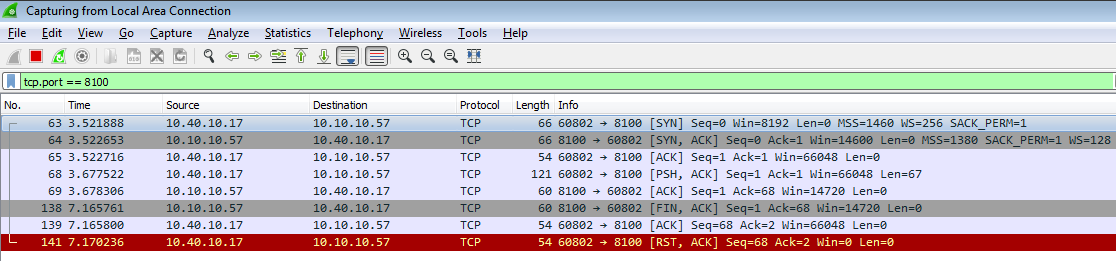
Wire shark captured packets:

Full Example:

Data communication between client (191.131.141.10.35752) and server(java2depth.6802)
23:18:46.969534 IP 191.131.141.10.35752 > java2depth.6802: Flags [.], seq 73894:75274, ack 33850, win 567, length 1380
23:18:46.969575 IP 191.131.141.10.35752 > java2depth.6802: Flags [P.], seq 75274:76220, ack 33850, win 567, length 946
23:18:46.979140 IP java2depth.6802 > 191.131.141.10.35752: Flags [P.], seq 33850:34406, ack 76220, win 501, length 556
23:18:46.979259 IP java2depth.6802 > 191.131.141.10.35752: Flags [P.], seq 34406:34407, ack 76220, win 501, length 1
23:19:20.725661 IP 191.131.141.10.35752 > java2depth.6802: Flags [.], seq 76220:77600, ack 34407, win 589, length 1380
23:19:20.725703 IP 191.131.141.10.35752 > java2depth.6802: Flags [.], seq 77600:78980, ack 34407, win 589, length 1380
23:19:20.725719 IP 191.131.141.10.35752 > java2depth.6802: Flags [.], seq 78980:80360, ack 34407, win 589, length 1380
23:19:20.725732 IP 191.131.141.10.35752 > java2depth.6802: Flags [P.], seq 80360:81311, ack 34407, win 589, length 951
23:19:21.121673 IP java2depth.6802 > 191.131.141.10.35752: Flags [.], seq 34407:35787, ack 81311, win 501, length 1380
23:19:21.121717 IP java2depth.6802 > 191.131.141.10.35752: Flags [P.], seq 35787:36907, ack 81311, win 501, length 1120
23:19:21.121920 IP java2depth.6802 > 191.131.141.10.35752: Flags [P.], seq 36907:36908, ack 81311, win 501, length 1
23:19:33.206778 IP 191.131.141.10.35752 > java2depth.6802: Flags [.], seq 81311:82691, ack 36908, win 633, length 1380
23:19:33.206831 IP 191.131.141.10.35752 > java2depth.6802: Flags [.], seq 82691:84071, ack 36908, win 633, length 1380
23:19:33.206845 IP 191.131.141.10.35752 > java2depth.6802: Flags [.], seq 84071:85451, ack 36908, win 633, length 1380
23:19:33.206858 IP 191.131.141.10.35752 > java2depth.6802: Flags [P.], seq 85451:86401, ack 36908, win 633, length 950
23:19:33.562822 IP java2depth.6802 > 191.131.141.10.35752: Flags [.], seq 36908:38288, ack 86401, win 501, length 1380
23:19:33.562866 IP java2depth.6802 > 191.131.141.10.35752: Flags [P.], seq 38288:39408, ack 86401, win 501, length 1120
23:19:33.562995 IP java2depth.6802 > 191.131.141.10.35752: Flags [P.], seq 39408:39409, ack 86401, win 501, length 1
23:19:44.121900 IP 191.131.141.10.35752 > java2depth.6802: Flags [.], seq 86401:87781, ack 39409, win 646, length 1380
23:19:44.121944 IP 191.131.141.10.35752 > java2depth.6802: Flags [.], seq 87781:89161, ack 39409, win 646, length 1380
23:19:44.121958 IP 191.131.141.10.35752 > java2depth.6802: Flags [.], seq 89161:90541, ack 39409, win 646, length 1380
23:19:44.121971 IP 191.131.141.10.35752 > java2depth.6802: Flags [P.], seq 90541:91492, ack 39409, win 646, length 951
23:19:44.445023 IP java2depth.6802 > 191.131.141.10.35752: Flags [.], seq 39409:40789, ack 91492, win 501, length 1380
23:19:44.445103 IP java2depth.6802 > 191.131.141.10.35752: Flags [P.], seq 40789:41909, ack 91492, win 501, length 1120
23:19:44.445299 IP java2depth.6802 > 191.131.141.10.35752: Flags [P.], seq 41909:41910, ack 91492, win 501, length 1
23:20:07.896851 IP 191.131.141.10.35752 > java2depth.6802: Flags [P.], seq 91492:91830, ack 41910, win 646, length 338
23:20:07.897741 IP java2depth.6802 > 191.131.141.10.35752: Flags [P.], seq 41910:42104, ack 91830, win 501, length 194
23:20:19.338310 IP 191.131.141.10.35752 > java2depth.6802: Flags [.], seq 91830:93210, ack 42104, win 646, length 1380
23:20:19.338366 IP 191.131.141.10.35752 > java2depth.6802: Flags [.], seq 93210:94590, ack 42104, win 646, length 1380
23:20:19.338379 IP 191.131.141.10.35752 > java2depth.6802: Flags [.], seq 94590:95970, ack 42104, win 646, length 1380
23:20:19.338392 IP 191.131.141.10.35752 > java2depth.6802: Flags [P.], seq 95970:97049, ack 42104, win 646, length 1079
23:20:19.860439 IP java2depth.6802 > 191.131.141.10.35752: Flags [.], seq 42104:43484, ack 97049, win 501, length 1380
23:20:19.860520 IP java2depth.6802 > 191.131.141.10.35752: Flags [P.], seq 43484:44540, ack 97049, win 501, length 1056
23:20:19.860804 IP java2depth.6802 > 191.131.141.10.35752: Flags [P.], seq 44540:44541, ack 97049, win 501, length 1


